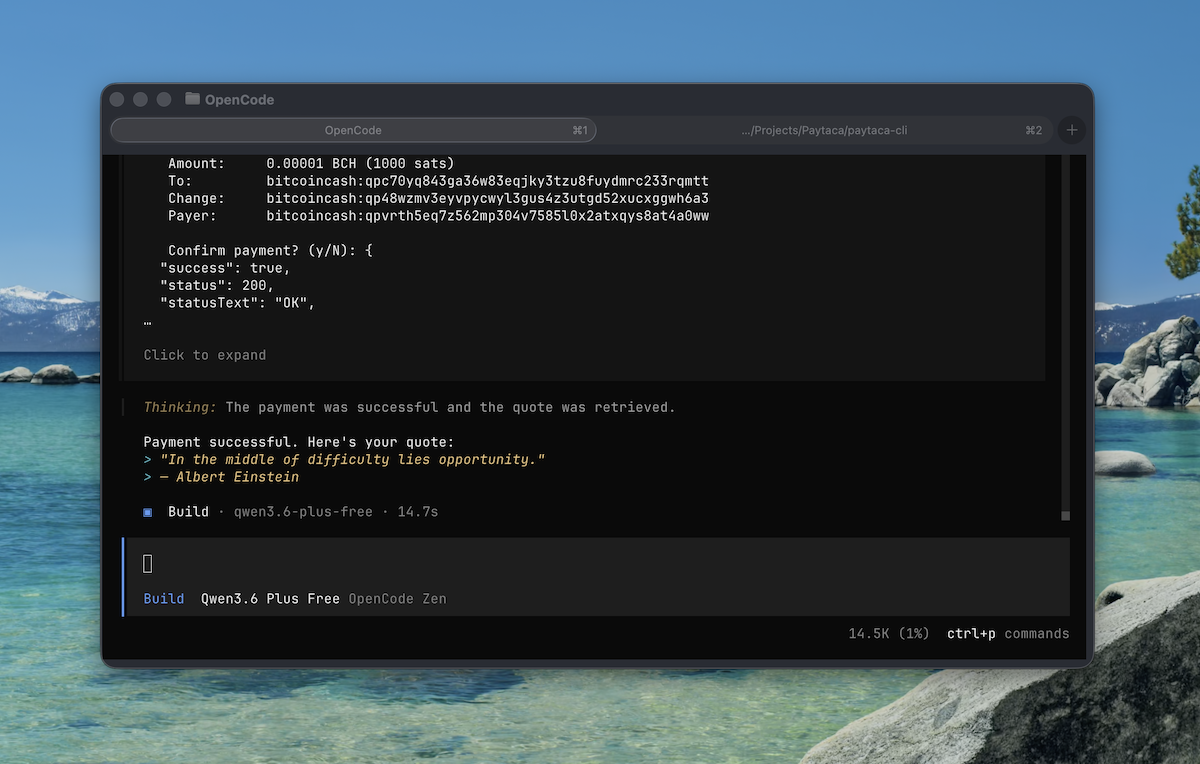
Paytaca CLI brings together x402-bch payment compatibility, a full Bitcoin Cash wallet, and built-in skills for OpenCode and Claude Code. It is not the first tool to enable AI payments—but it is the first to combine permissionless BCH payments with AI agent integration.
The Payment Landscape for AI Agents
AI agents can write code, analyze data, and interact with APIs. But when an API requires payment, the agent needs a way to pay. Several solutions have emerged:
Visa CLI from Visa Crypto Labs enables AI agents to make crypto payments programmatically—but it is built on traditional payment rails with the compliance requirements that come with them.
Sol CLI brings Solana payments to AI agents with skills for OpenClaw and Claude Code. Solana offers fast, low-cost transactions.
x402 on Stellar enables AI agents to pay for APIs autonomously using Stellar’s network.
xrpl-cli-ng provides an XRPL CLI built for AI agents.
Kraken CLI offers a command-line tool for AI agent trading and payments.
These are all valid approaches. The question is not whether solutions exist—it is about trade-offs: permissionless vs. compliant, custodial vs. non-custodial, and which network’s characteristics best fit the use case.
Where Paytaca CLI Fits
Paytaca CLI is a command-line Bitcoin Cash wallet that implements x402-bch payments and includes built-in skills for AI agents.
It builds on the x402-bch specification developed by Chris Troutner, implementing the protocol alongside a complete BCH wallet. The result is three capabilities in one tool:
- x402-bch compatible: Works with any server implementing the x402-bch v2.2 specification
- Full BCH wallet: Balance, send, receive, transaction history, CashTokens (fungible tokens and NFTs)
- AI agent skills: Three modular skills for 45+ AI frameworks to automatically handle x402 payment requests
The combination is the differentiator. The x402-bch specification exists independently. BCH wallets exist independently. Paytaca CLI brings them together with AI agent integration.
Why Bitcoin Cash?
Bitcoin Cash has specific characteristics that make it well-suited for API micropayments:
| Feature | Bitcoin Cash | Solana | Stellar | Lightning |
|---|---|---|---|---|
| Avg fee per tx | ~1 sat (~$0.005) | ~$0.001 | ~$0.00001 | Variable |
| Fee predictability | Predictable (large blocks) | Unpredictable (priority fee spikes) | Unpredictable (surge pricing) | Variable (routing fees) |
| Setup complexity | None | None | None | Channel management |
| Permissionless | Yes | Yes | Yes | Somewhat |
| Payment finality | Near-instant | ~400ms | 3-5 seconds | Near-instant |
For payments where an agent might spend fractions of a cent per API call, BCH offers low cost, predictable fees, simplicity, and true permissionlessness.
Tutorial: Getting Started
Installation
npm install -g paytaca-cli
Or from source:
git clone https://github.com/paytaca/paytaca-cli.git
cd paytaca-cli
npm install
npm run build
npm link
Setup
Create a wallet:
paytaca wallet create
This generates a 12-word seed phrase stored in your OS keychain (Keychain on macOS, GNOME Keyring on Linux, Credential Manager on Windows).
For testing on chipnet (testnet):
paytaca wallet create --chipnet
Checking API Requirements
Before calling a paid API, check if payment is required:
paytaca check https://api.example.com/endpoint --json
Output:
{
  "acceptsX402": true,
  "acceptsBch": true,
  "paymentRequired": true,
  "estimatedCostSats": "100",
  "costInBch": "0.00000100"
}
Making a Paid Request
paytaca pay https://api.example.com/endpoint --json
The CLI handles the full x402 flow:
- Receives 402 Payment Required response
- Parses payment requirements
- Builds and broadcasts BCH transaction
- Signs the payment proof
- Retries request with payment header
- Returns the API response
For POST requests:
paytaca pay https://api.example.com/generate --method POST --body '{"prompt":"hello"}' --json
Preview without paying:
paytaca pay https://api.example.com/endpoint --dry-run
Skip confirmation prompt (after user approval):
paytaca pay https://api.example.com/endpoint --confirmed --json
The --confirmed flag skips the interactive confirmation prompt—use only after obtaining explicit user approval.
AI Agent Integration
Paytaca CLI provides AI agent skills for wallet operations. Install from GitHub using the npx skills CLI (supports 45+ AI frameworks):
# Install specific skill for your AI agent
npx skills add paytaca/paytaca-cli --skill <skill-name> -a <agent> -g

# Install all skills
npx skills add paytaca/paytaca-cli --all
Available Skills:
| Skill | Purpose | Approval Needed |
|---|---|---|
| paytaca-x402 | HTTP 402 payment handling | Yes (before payment) |
| paytaca-wallet | Balance, addresses, history, token info | No (read-only) |
| paytaca-send | Send BCH and CashTokens | Yes (before sending) |
Examples:
npx skills add paytaca/paytaca-cli --skill paytaca-x402 -a opencode -g
npx skills add paytaca/paytaca-cli --skill paytaca-wallet -a claude-code -g
npx skills add paytaca/paytaca-cli --skill paytaca-send -a cursor -g
Supported frameworks: OpenCode, Claude Code, OpenClaw, Cursor, Cline, Windsurf, Roo, Gemini CLI, Codex, GitHub Copilot, Goose, Trae, Kiro CLI, and 30+ more.
The skills teach the agent to:
- Check if a URL requires payment using
paytaca check - Inform the user of the cost and wait for explicit approval
- Execute
paytaca pay --confirmedto handle the 402 response - Parse the response and continue the task
This means an AI agent can handle paid APIs autonomously—with user approval at each step.
More Than Payments
Paytaca CLI is a complete BCH wallet:
paytaca balance                    # Check balance
paytaca receive                    # Get receiving address (with QR code)
paytaca send <address> <amount>   # Send BCH
paytaca history                    # View transactions
paytaca token list                 # List CashTokens
paytaca token send <addr> <amt> --token <category>  # Send fungible tokens
paytaca token send-nft <addr> --token <cat> --commitment <hex>  # Send NFTs
Seed phrases are stored in the OS keychain—never in config files or environment variables.
How x402-bch Works
The x402 protocol, created by Coinbase, standardizes HTTP payments. Chris Troutner’s x402-bch specification adapts it for Bitcoin Cash.
Flow:
- Client requests resource
- Server responds with
402 Payment Requiredand payment details - Client pays the specified amount to the specified address
- Client retries request with cryptographic payment proof
- Server verifies and serves the response
Paytaca CLI implements v2.2 and is compatible with any x402-bch server.
How It Compares
| Solution | Network | Permissionless | Non-custodial | AI Agent Skills |
|---|---|---|---|---|
| Visa CLI | Card rails | No | No | No |
| Sol CLI | Solana | Yes | Yes | Yes |
| x402 Stellar | Stellar | Yes | Yes | No |
| xrpl-cli-ng | XRP Ledger | Yes | Yes | No |
| Paytaca CLI | BCH | Yes | Yes | Yes |
Paytaca CLI is the combination point: x402-bch compatibility plus AI agent skills, on a network designed for peer-to-peer electronic cash.
Use Cases
- Autonomous API access: Agents paying per-call for data, compute, or AI services
- Testing x402 APIs: Developers testing paid endpoints without account setup
- Scripted workflows: Automation accessing paid resources
- Micro SaaS: Charging fractions of a cent per API call
Getting Started
# Install
npm install -g paytaca-cli

# Create wallet
paytaca wallet create

# Fund it
paytaca receive

# Install AI agent skill
npx skills add paytaca/paytaca-cli --skill paytaca-x402 -a opencode -g

# Check a paid API
paytaca check https://api.example.com/endpoint --json

# Make a paid request
paytaca pay https://api.example.com/endpoint --json

# View history
paytaca history
Summary
Paytaca CLI brings together:
- x402-bch compatibility — Built on Chris Troutner’s specification for Bitcoin Cash HTTP payments
- Complete BCH wallet — Send, receive, CashTokens, transaction history
- AI agent skills — Three modular skills for 45+ AI frameworks
It is not the first tool to enable AI payments—Visa CLI, Sol CLI, and others exist. But it is the first to combine x402-bch payments with AI agent integration on Bitcoin Cash.
For developers who want permissionless payments, non-custodial key storage, and sub-cent fees—without building integration from scratch—Paytaca CLI is a ready-made solution.
Repository: github.com/paytaca/paytaca-cli
x402-bch Specification: github.com/x402-bch/x402-bch